


Welcome to
Staff Attendance & Site Access
Clocking in and out, made simple
Never Lose Track of Attendance Again
Live Activity Table
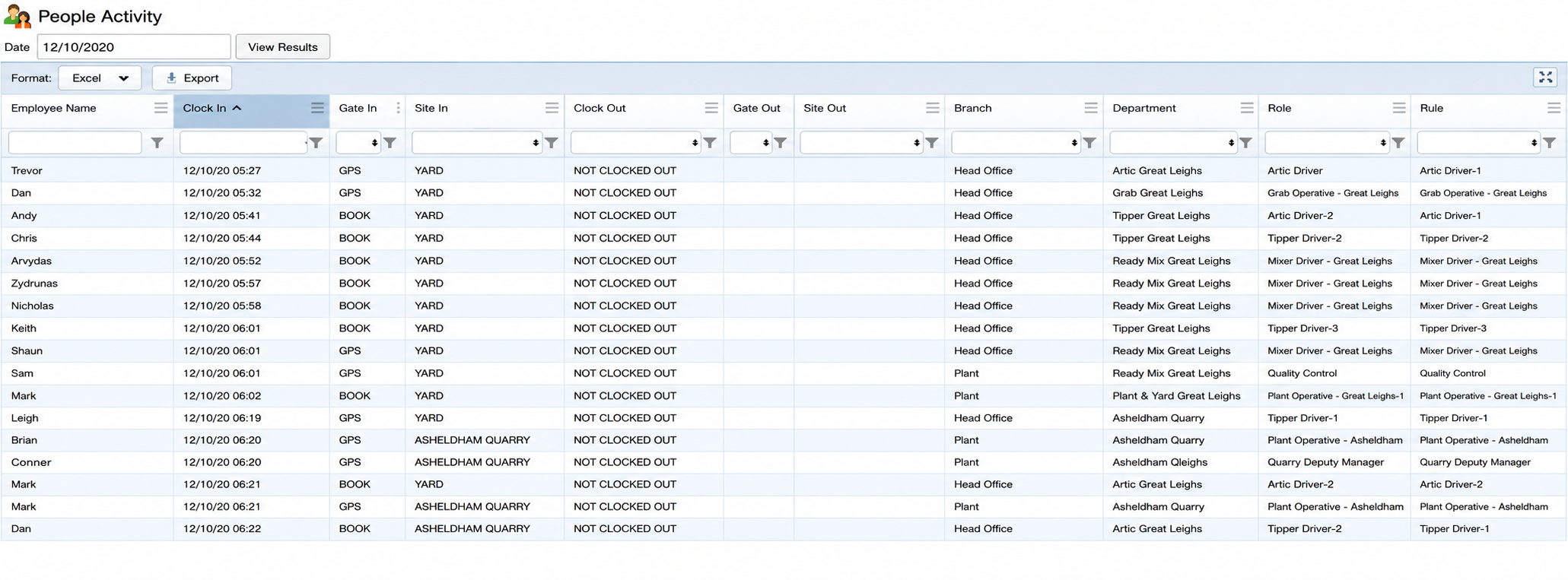
See exactly who's working, where they're working, and when they signed in.
Features
View employees by department
Filter and sort the live activity table
Monitor multiple sites in real time
Instantly see who's currently on shift
GPS Clock In
No hardware needed. Operatives clock in using the ACMetrix app, with GPS confirming they're at the correct site.
Plug & Play Scanner
A facial recognition scanner that's quick to install and ready to use.
Scanner + Turnstile
Only verified operatives get through while every entry is clocked automatically.
Existing Access Control
Integrates with ACT and Dahua systems, so clocking becomes part of your existing entry setup.
Choose the setup that fits your site
Choose the clock-in method that works for your site. Whether you need a simple mobile solution or fully integrated access control, ACMetrix adapts to the way your team works.
Not sure which setup suits your site? We’ll help you choose the option that best fits your site, workforce and access requirements, so you get the right setup without unnecessary complexity.
How It Works
Whether your operatives clock in using the app or a face scanner, every attendance record ends up in the same portal.
1. Open the App
The operative opens ACMetrix and selects their site.
1. Register Once
Upload a photo in the app and complete verification before using the scanner.
2. Clock In
Tap Arrived when you get there and Left Site when you leave.
2. Look at the Scanner
Simply look at the face scanner to clock in or out—no cards or devices required.
3. GPS Confirms
GPS checks that each clock-in was made from the correct site.
3. Entry Recorded
Every arrival and departure is automatically timestamped against that operative.
Every Clock-In Ends in the Same Place
Whether it's a phone or a face scanner, every attendance record is instantly available in your portal, timesheets and reports.
Why Sites Implement
Trusted by businesses to simplify attendance tracking, improve site security and reduce payroll administration.
Everything you need to keep attendance accurate, improve site visibility and reduce admin.
Accurate Attendance
Time in and out for every operative, every shift.
Built-In Checks
Facial recognition and GPS help ensure every clock-in is genuine.
Clear Visibility
See who's on site and when across every site from one portal.
Less Admin
Hours are ready to review and export for payroll, while operatives can check their own attendance.
Seamless Payroll Integration
Clocking data flows directly into CYCLOPS, our advanced payroll management system, so recorded hours move straight into payroll without manual entry—saving time, reducing errors and keeping payroll accurate.
Enquire Now
Your next challenge. Our next solution.
Whatever your security, property or business support needs, we’ll take the time to understand what matters to you and recommend a practical solution. Tell us what you need, and let’s explore how Bridge can help.